
Business software • Local and secure
Every part of your business
Every part of your business
in one place.
From your first invoice to your latest financial report, ORASOFT ERP gives you a clear view of sales, purchasing, inventory and accounting in a practical desktop system.
✓ Trial of up to 40 transactions✓ Windows installation✓ Data stays on your computer
Performance dashboard
Sales activity Last 7 days
SalesInventoryAccountsReports
40Trial transactions
5092Fixed local port
24/7Local operation
RTLFull Arabic interface
More control. Fewer steps.
Connected everyday tools help your team work efficiently and give management numbers it can rely on.
Fast checkout
Barcode scanning, cash or card payments, thermal receipts, and suspended invoices you can resume later.
Inventory control
Products, multiple units, conversion factors, barcodes, stock counts and traceable movements.
Electronic invoicing
Configure ZATCA integration, manage device certificates and monitor invoice submission.
Backup and restore
Schedule several backups each day and safely restore from a backup or an earlier database folder.
Connected sales and purchasing
Invoices, returns, quotations and receipt vouchers update stock and accounts together.
User permissions
Choose the screens and actions each employee can access, with records of sensitive actions.
Printable reports
Export PDF or Excel, and print in A4 or thermal format as appropriate for the report.
Documented support
Activation, recovery and maintenance requests from within the system, with approvals and an audit trail.
Safe automatic updates
Get notified of approved releases. With your consent, download and install them while keeping your data, settings and printers.
Multiple units per product
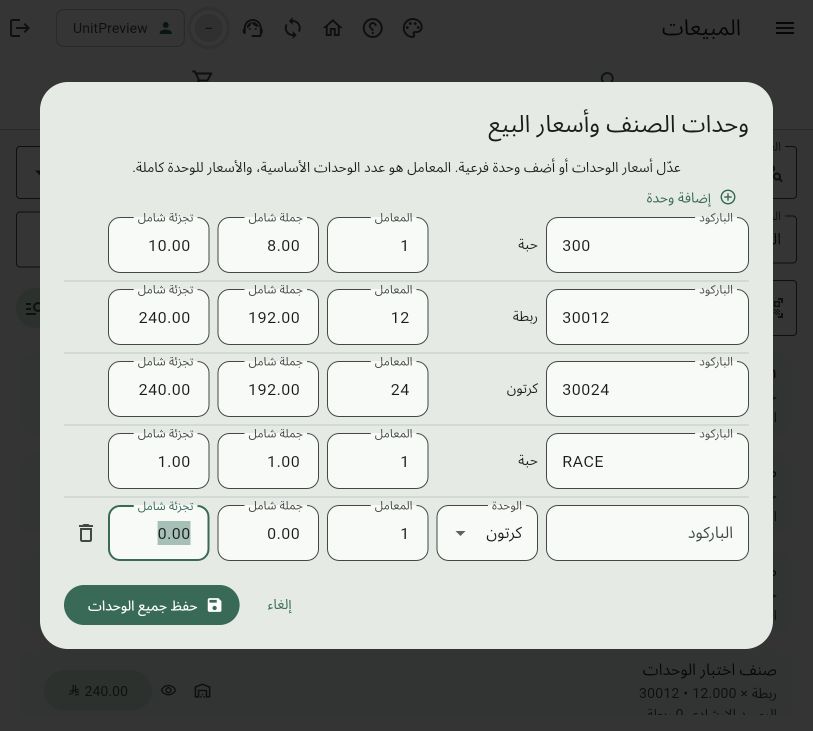
Purchase and sell in any configured unit, with its own conversion factor, barcode and price.
One platformGrow your business,
Grow your business,
not its complexity.
Consistent workflows from sales and purchasing to posting and reporting, without entering the same information in separate systems.
Start a trial →Sales and customers
Invoices, returns, quotations and customer activity.
Purchasing and suppliers
A clear purchasing cycle from entry to accounting.
Inventory and products
Barcodes, units, categories, stock counts and movement reports.
Accounting and reports
Chart of accounts, journal entries, statements and management reports.
What can it do?Connected services
Connected services
from daily work to decisions.
Each transaction is entered once and flows through inventory, accounting and reporting according to the user's permissions.
Point of sale
- Barcodes, units and multiple prices
- Cash, card and credit sales
- Suspend and resume invoices
- Thermal or A4 printing
Inventory management
- Buy or sell in any unit
- Unit-specific factors, barcodes and prices
- Warehouse and branch balances
- Stock counts, transfers and tracking
Accounting and follow-up
- Journal entries and payment vouchers
- Customer and supplier statements
- Daily cash and card closing
- Exportable period reports
Compliance and continuity
- E-invoicing and ZATCA integration
- Multiple scheduled backups
- Safe recovery and support approval
- Licensing, support and audit trail
Decide with numbersFrom today's activity
From today's activity
to the details.
Review a selected period, compare cash, card, credit, cost and profit, then export the report in the format you need.
- Activity statements and daily closing
- Sales, purchase and return registers
- Customer and supplier statements
- Inventory, movement, profit and tax reports
Sales activity report1–30 September 2026
PDF · ExcelNet activity86,940.00
Before VAT75,600.00VAT11,340.00
System screensChoose a screen.
Choose a screen.
See how it works.
Simplified interactive previews show the layout and main actions. Select a screen to explore it.
Point of sale
Fast sales invoice
Scan a barcode, check stock, select payment, then save and print.
- Fast barcode entry
- Cash, card and credit
- Clear totals and VAT
01Interactive system preview
View an actual product-units and sales-prices screen
Ready to tryTry ORASOFT ERP
Try ORASOFT ERP
on your computer today.
The Windows trial includes a clean starter database, one primary user and up to 40 transactions. Website updates do not silently replace your installed desktop release.
Published desktop versionv130.201
⊞
Windows desktop edition
Windows 10/11 • 64-bit
Includes the application server and PostgreSQL database.
Frequently asked questions
Does the desktop edition need an internet connection?
The application and data run locally. Activation, support and certain connected services require internet access.
Where is my data stored?
The desktop database is stored on your computer. You can export a backup to an external disk or USB drive.
Will a website update change my installed application?
No. Each desktop release is fixed and only changes when you install a newly approved Setup package.
How do I get support?
Use the support portal to follow activation and technical requests through your customer account.
Contact and payment
We're here to help.
For questions, support or a bank-transfer notice, contact Diwaniyat Alhasib Computer Services directly.
Diwaniyat Alhasib Computer Services
Call, message us on WhatsApp, or find the office on Google Maps.
Bank transfer details
Al Rajhi Bank — please verify the beneficiary's name and contact us after your transfer.
Account number456000010006080855137
IBANSA7980000456608010855137